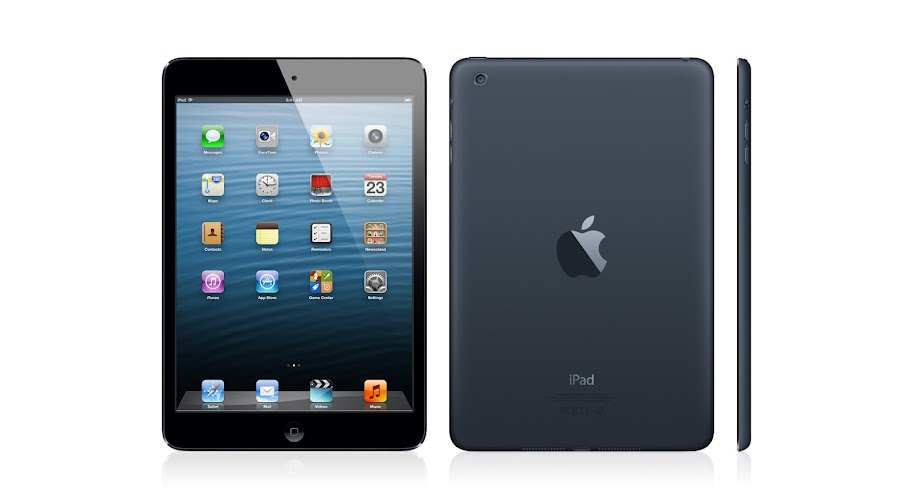
IPAD must-haves. And fun-to-haves.

Brighten your iPad with a colorful cover, stream to your TV, download pictures from your digital camera, and more. There’s already so much you can do with iPad and iPad mini

Apple Wireless Keyboard

The incredibly thin Apple Wireless Keyboard uses Bluetooth technology, which makes it compatible with iPad

Apple unveils iPad mini: ‘Thin as a pencil, light as paper’

iPad inspires creativity and hands-on learning with features you won’t find in any other educational tool

Lightning connector and FaceTime HD camera

Apple announces 4th generation iPad packing an A6X CPU

Pages

Showing posts with label Label. Show all posts

Saturday, August 17, 2013

NSTextfield setStringValue will not change label text.


Hello All,


I am about to my wits end on this particular issue that I am expierencing. I am unable to set the title of a simple label. I have tried all sorts of things like [self.property setStringValue:@"test"] and not even that will work in changing the labels. I've followed countless tutorials and other online references and they all appear to done this the exact same as I have... I would greatly appreciate recieving a little help in figuring out why it's happening and how it should be fixed properly. The easiest way to show what I have so far will be via screenshots and code examples.


xib file and containing outlets of the labels in question. This is to show that the labels are propperly hooked up as IBOutlets


Here is the relevant code. This is what is called in AppDelegate so you know where to start reading in the code:


-(void)applicationDidFinishLaunching:(NSNotification *)aNotification{


     RamdiskSize *caller =[[RamdiskSize alloc]init];


     [caller changeSizeLabels];


}


And here is the results, as you can see the placeholder strings are still in place and were not affected by the setStringValue methods.


And I will include all related code below:


AppDelegate.m:

@implementation AppDelegate- (void)applicationDidFinishLaunching:(NSNotification *)aNotification{        RamdiskSize *caller =[[RamdiskSize alloc]init];    [caller changeSizeLabels];}@end


RamdiskSize.h:

#import #import "MemoryMonitoring.h"@interface RamdiskSize : NSObject@property (weak) IBOutlet NSTextField *minSizeLabel;@property (weak) IBOutlet NSTextField *halfSizeLabel;@property (weak) IBOutlet NSTextField *maxSizeLabel;  -(void)changeTextLabel:(NSTextField *)whichlabel sizeLabel:(NSString *)labelText;-(NSArray *)defineSizeValueLabels;-(void)changeSizeLabels;@end


RamdiskSize.m

#import "RamdiskSize.h"@implementation RamdiskSize@synthesize maxSizeLabel, minSizeLabel, halfSizeLabel;-(void)changeTextLabel:(NSTextField *)whichlabel sizeLabel:(NSString *)labelText{    [whichlabel setStringValue:labelText]; }//  Get Physical memory in MB-(NSArray *)defineSizeValueLabels{    MemoryMonitoring *physicalMemoryObj = [[MemoryMonitoring alloc]init];    unsigned long long physicalMemoryValue = [physicalMemoryObj getPhysicalMemoryValue];    float maxSize = (((float)physicalMemoryValue/1024)/1);    float halfSize = (((float)physicalMemoryValue/1024)/2);    float minSize = ((((float)physicalMemoryValue/1024)/((float)physicalMemoryValue/1024))/2);        return [[NSArray alloc] initWithObjects:[NSNumber numberWithFloat:minSize],[NSNumber numberWithFloat:halfSize],[NSNumber numberWithFloat:maxSize], nil];  }  -(void)changeSizeLabels{    NSArray *sizeArray = [NSArray arrayWithArray:[self defineSizeValueLabels]];    [maxSizeLabel setStringValue:[NSString stringWithFormat:@"%.f GB",[[sizeArray objectAtIndex:2] floatValue]]];    [halfSizeLabel setStringValue:[NSString stringWithFormat:@"%.f GB",[[sizeArray objectAtIndex:1] floatValue]]];    [minSizeLabel setStringValue:[NSString stringWithFormat:@"%.1f GB",[[sizeArray objectAtIndex:0] floatValue]]];}@end

View the original article here

Wednesday, March 27, 2013

How can I edit boot screen image label windows

Not sure where to ask this as no real area for it ?


I have just clone my main HDD and bootcamp windows Vista , and put old drive in the Optical Bay , renamed the Partitions .

Now I have

Mac 1tb

Mac 500GB

Windows

Windows

Recovery 10.8


I want to rename one or Both of the Windows image labels in the boot screen ?

I have tried in Mac side , manually and in disk Utility

Tried in windows side in right click and then change name ,


But nothing seems to change the Name in the Boot image .


If I cannot change the name is there a way to unmount the image in the optical drive and stays uncounted when I restart to get to windows ?


Cheers mark


View the original article here

Tuesday, February 26, 2013

How to change the text color of a label by using RGB values without changing the background colour?

xCode interface builder:


When I try to change the color property of a label's text by using the RGB values, the background color also changes to the same value automatically.


in other words:


While setting the RGB values for text colour of labels, the background colour also changes unless we use the sliders.


How to make sure that only the color of text changes and not the background?


View the original article here

Saturday, February 23, 2013

Re: How to change the text color of a label by using RGB values without changing the background colour?

You can simply do this.


    [labelname setTextColor:[UIColor colorWithRed:38/255.0f green:171/255.0f blue:226/255.0f alpha:1.0f]];


View the original article here

Friday, January 11, 2013

Re: Xcode Build and Run window doesn't show anything i done in .xib even a Label?

Oh you right thank you very much Mark.


View the original article here

Re: Xcode Build and Run window doesn't show anything i done in .xib even a Label?

Oh you right thank you very much Mark.


View the original article here

Thursday, January 10, 2013

Xcode Build and Run window doesn't show anything i done in .xib even a Label?

I am new to xcode ,try to learn programing ,i try to build a simple Mac program ,i drag a label icon to .xib user interface and SAVE then RUN ,in the window it won't show anything ?  anyone can help ? thanks


View the original article here

Xcode Build and Run window doesn't show anything i done in .xib even a Label?

I am new to xcode ,try to learn programing ,i try to build a simple Mac program ,i drag a label icon to .xib user interface and SAVE then RUN ,in the window it won't show anything ?  anyone can help ? thanks


View the original article here