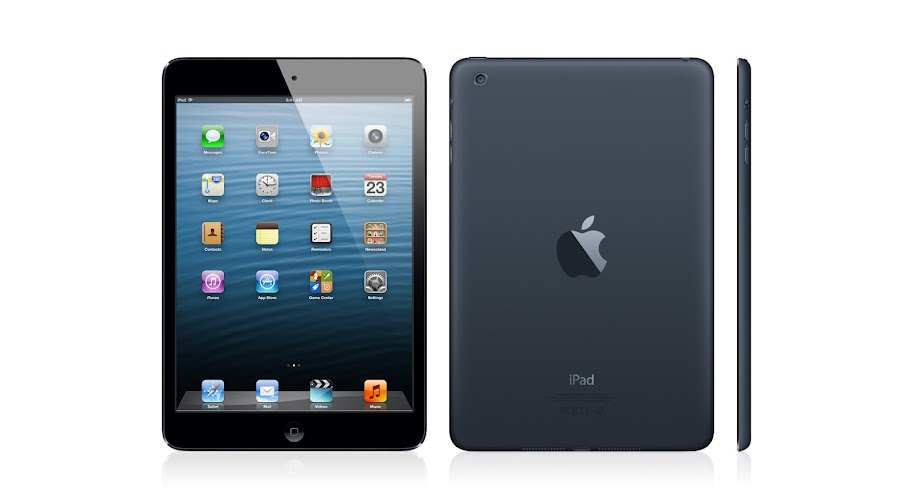
IPAD must-haves. And fun-to-haves.

Brighten your iPad with a colorful cover, stream to your TV, download pictures from your digital camera, and more. There’s already so much you can do with iPad and iPad mini

Apple Wireless Keyboard

The incredibly thin Apple Wireless Keyboard uses Bluetooth technology, which makes it compatible with iPad

Apple unveils iPad mini: ‘Thin as a pencil, light as paper’

iPad inspires creativity and hands-on learning with features you won’t find in any other educational tool

Lightning connector and FaceTime HD camera

Apple announces 4th generation iPad packing an A6X CPU

Pages

Showing posts with label development. Show all posts

Monday, April 28, 2014

App Development 102: Getting Started

So you have read the first User Tip - App Development 101: Planning and are now ready to get started. Good. Let's do that.


The previous User Tip was addressed at both business owners and developers. This, and any subsequent ones, are focused more towards developers. But there may still be some technical planning that only the business owner can perform. If the app your are planning is going to interact with other services on the internet, then you will need to work with your developer to plan how to access them. If these are not your own services, then you may need legal advice as well. The internet is often thought of as a freewheeling, copyright-free, anything goes zone. For most consumer-level activity, that is pretty much true. For business activity, that is not true at all. Companies that turn a blind eye towards pervasive, worldwide copyright infringement by consumers will sue a business in a hearbeat for even the slightest hint of infringement of intellectual property like copyrights, trademarks, and/or patents. Doubt me at your peril. 


It is a critical responsibility of both the business owner and developer to ensure that you are not violating anyone else's rights regarding their intellectual property. That includes artwork and sounds in your app, marketing materials, trade names, and internet services. Internet services that are not your own will come with terms of use that you must follow. As a business, even if providing a free app, most of those consumer-level terms don't apply. You must read them very carefully to see what you can and can't do from an app. Remember that you are not Google and you will not get a free Fair Use pass. What is acceptable for major corporations, or indvidual consumers, is sometimes illegal for small businesses. Such is the way of the world.


That being said, there are many services that you can use. Just read the terms of use. Apple offers many internet services such as iAd, Maps, iCloud, iTunes, and others. There are a number of organizations that provide open data such as Wikipedia, OpenStreetMap, and governent agencies. Read their terms of use and use them.


If you are writing an app that will make use of internet services, either your own or from someone else, the first task is to identify how to access them. In some cases, their authors provide SDKs that can be included in your app. In other cases, there are published specifications on how to access this data. If you are planning your own internet service for your app, then you should design and test it before your app. The standard method for accessing internet services today is using a RESTful architecture with JSON data. You can, and should, develop and test access using tools like CURL and Perl, Python, Javascript, etc. from the command line. You may want to setup a local web server for testing the entire system on your Mac.


Although this is technically the "Getting Started" Tip, you never stop planning. Consider how your app and service will scale. Maybe your app will become an overnight sensation. The last thing you want to see is a popular app get stopped by a insufficient infrastructure. You could overwhelm a third party service provider and they could cut off access to their service. This is another reason to have your own servers available. You might want to consider cloud services as well. You need to make sure that the methods and technologies you use can be moved to new servers and distributed across the cloud, if necessary. From an app perspective, your servers are more than just web servers. Apache may not be appropriate. You may want to consider other servers such as Nginx and Node.JS. Even if your needs are modest, I strongly recommend Node.JS for internet services. It is very easy to write a Javascript RESTful server in Node.JS. No PHP or CSS required.


Don't neglect your data. While you may not be concerned about scaling, there are other factors to consider. If you are providing internet services to your app, you will probably need a database. On the server side, MySQL is easy and ubiquitous. If you need to persist data inside the app, we use Core Data now. There are other methods, but they are at risk of scale. If you are developing apps as a way to market yourself, then be honest about that and factor it into your plans. While you may not need anything more than MySQL, NoSQL experience is far more valuable these days. The same applies for Cloud services.


Don't forget security. Security is a huge topic. If you are providing internet services, be very careful about private user information. Abuse of private information can get you kicked out of the Apple Developer program, or worse. Don't assume your service won't be hacked. It will. You may want to consider encryption. If so, that will require yet more planning, paperwork, and time to secure the appropriate certifications from the US government so your app can be sold or downloaded from Apple's US-based services.


What happened to Getting Started? We haven't even started coding yet? That's next in App Store 103: Coding.


View the original article here

App Development 103: Introduction to Coding

Finally ready to start coding? Before getting too excited, make sure to read App Development 101: Planning and App Development 102: Getting Started first.


First ask yourself a question. Do you have any coding experience? If the answer is yes, then skip to App Development 104: Coding on the Mac. If the answer is no, then read on, because you need to get some experience. The nice part about this is that any coding experience is good experience. You don't need to learn Objective-C to start. You don't have to have a Mac to get starting coding. While having both would be ideal, if you don't have any coding experience at all, but do have an opportunity to learn other languages on other platforms, then take it. There are a number of ways to start learning, each with its own issues.


The traditional route - school. You can always enroll in programming classes at your local college or university. This is how most developers working today learned how to code. But the demographics are changing and a university degree in computer science is no longer a requirement, if it ever was. The good part about formal education is that you you have a very high chance of success. You will learn both computer science theory and practical, hands-on experience. Both are critical for success. The bad part about formal education is the formality. They teach what is easily teachable, not necessarily what you want or need to know. It takes a long time. Classes run at their own pace, which is likely either faster or slower than you would like. Finally, higher education is meant to teach you anything. It is designed to provide you with a degree that is evidence of your abilities, not your skills. The weeding out of the less capable students is just as important as the teaching. Professors provide some assistance but it is ultimately the responsibility of the student to learn. At the top end of the market are big, expensive, private "Ivy League" universities that focus on high admission standards so they have the luxury of having only the best students who will all get jobs upon graduation. At the bottom end are the big, expensive, private "for-profit" universities that focus on profit and provide degrees that have very little marketable value. In the middle are a network of big and small, public and private institutions where you might be able to attend, actually learn something, and maybe put that to use. But you are going to have to work at it.


Do not bother to look for Macintosh or iOS-specific classes. At best, those would be upper-level classes and usually just don't exist. Again, any experience is good experience. Don't fall into the university trap of focusing on languages like Python, C, Java, C++, etc. Language is irrelevent. Each language has its own specific traits and focus. There is nothing wrong with that. Just learn another language and compare.


The do-it-yourself route - books, videos, and tutorials. Included in this category are any online classes from any institution that would otherwise be listed above. Programming is inherently a hands-on learning task. With enough practice, you can learn how to code. Undoubtedly you will miss out on a lot.  Here is a list of recommended introductiont to programming books:

1) I need content here

2) K & R?

3) Big Nerd Ranch?


The bootcamp route. The latest craze in app development is the bootcamp. These are private, relatively short classes that focus only on programming - no French literature, hélas. These bootcamps will focus more on practical skills that are in demand. They are usually offered in major metropolitain areas. Some recommended bootcamp-style programs are:

1) I need content here

2) Big Nerd Ranch?


Finally, recognize that learning how to code takes time. There is no shortcut. Don't be intimidated by people who already know a lot. Also, don't try to code past your abilities. Work on projects that are only a little harder than you can manage. At any given stage of a programmer's development, there are lots of other programmers at the same stage. Seek out help online and in person from people who are close to your own abilities and experience level. They will better understand the problems you are having and will be better able to explain it than even someone who knows the material better. Look for online forums, clubs, and meetup groups. However, there is no need to wait until you have all the answers. Once you have written some cool code and developed an app you think would be valuable to someone, post it on GitHub and/or the App Store. Nothing has to be perfect.


Speaking of GitHub, be careful with open source. Open souce software can be a tremendously useful resource for end users and developers. I fear that it could be less useful for people trying to learn how to code. Don't use code that you don't understand. Play around with it. Modify it. Ask the author about it. Those are the strengths of open source. You can use it as a tool to code beyond your abilities, but remember Gandalf's advice, "Perilous to us all are the devices of an art deeper than we possess ourselves."


In spite of what you may have heard, Free and Open Source software is founded upon intellectual property and copyright. You must read and comply with all software licenses, especially as a developer. In some cases, developers are the ones that have extra work to do in order to comply with open source licenses.


Whatever route you take to get there, App Development is going to require Objective-C. If you already know C or C++, great. You are halfway there, if not more. If you don't already know C, now is the time to start. If you do know other languages, then the biggest difference is syntax. You can learn C on any platform, with any tools. The goal is not mastery of C, just the basics. If you want to start learning C on the Mac, then go ahead and proceed to the next User Tip, App Development 104: Coding on the Mac.


Writing Mac and iOS apps is an advanced topic. Don't try to build Rome in a day. Start small and slow. Take your time. Learn how to code. Learn to make good use of online resources like:

stackoverflow

Apple Support Communities

GitHub


When you have mastered the basics and are ready to write some real Mac or iOS code, then proceed to App Development 104: Coding on the Mac.


View the original article here

App Development 101: Planning

So you want to get into the App Store, eh? This User Tip is a general road map of how to do that successfully. It doesn't have a step-by-step guide, but instead offers a road map to plan your journey to the App Store. This User Tip is targeted at both would-be App Store developers and business people.


The most important part of this journey is your goal. Where do you want to go and how do you want to get there? If you are a business owner who wants better penetration into the internet mobile device market, then you should strongly consider a mobile-friendly web site. They are easy to do yet surprisingly rare. They cover both iOS and Android devices. Nobody needs to approve anything. The principle is pretty simple. Take your existing web site, separate the content from the presentation. Create a set of desktop styles and a set of mobile styles. You're done.


You're still not sold. You want an app. OK. First realize that Apple demands that apps offer more functionality than just a mobile web site. If you are really developing a mobile web site, see the above paragraph. If you really want an app, then make sure to think of real functionality you can provide to your users, something that brings them value, and brings more value to their device.


What if you are a developer wanting to start a business? Unfortunately, others have already beaten you to the market. It is going to be an uphill battle. Unless you have money to live on while you develop your app full time, and funding to advertise your app when done, the hill will be very steep indeed. More and more, the App Store (Apple's and Google's) are turning into a marketplace of developers as much as apps. The race to the bottom is nearing the finish line. If you want to get a job developing mobile apps, you must have already published apps, preferably in both Apple and Google stores. If you are really marketing your own skills, why are you charging money? That is like sending a resume and asking for payment to see it. Obviously that is not going to work, so why not make free apps? Receipt managment and in-app purchases are hot skills, so go ahead and make a freemium app. Just don't expect to get rich. If you are able to make enough money to purchase some test devices, you are being successful. If you do get lucky and get rich, congratulations!


There are two partners in this dance, the business owner and the developer. If both roles are being played by the same person, you have twice as much work to do. See the above paragraph. If not, there are some other factors to consider, most importantly, money and intellectual property. The person who controls the Apple Developer account controls the app. That person can release updates, collect profits, and is responsible for support. If you are hiring a developer to build an app for you, you must obtain your own Apple Developer account. You give your developer limited access to that account. You must retain ownership of the source code to the app in case you need to hire a new developer.


If you are a business owner wanting to hire a developer, then you are going to need a Business Apple Developer account. This grants the individual people involved with the account some anonymity. Plus, this is a world-wide busiess being run out of Apple's store-front. Because of these issues, opening a business developer account will require paperwork, planning, verification, and time. Fraud is a major, world-wide problem and the law stops at national borders. If your company is not based in the United States, you will need even more paperwork, planning, verification, and time. Delays of weeks or even months are commonly reported. If you don't require a business account, then you should strongly consider an Individual Apple Developer account. You do lose some anonymity, but you are installing software on people's devices after all. Even with the App Store restrictions, that is a big responsibility not to be taken lightly. Own your name and be proud of it and the work associated with it.


Intellectual property issues aren't restricted to the App Store. If you are selling an app, or even giving one away, you must support it. This will require your own web siite and e-mail that are under your control. This means you will need to purchase your own internet domain name and your own web hosting service. There are many, many companies that provide these services. Personally, I use Dreamhost and have been very happy with them.


Creating an Apple Developer account requires that you be old enough to enter into a legal contract. That means you must be 18 years old or older. If you are younger than that, don't despair. Apple has an option for young developers. You can have your parent or guardian open a developer account in their name and you can legally use it to publish apps. Everything will be under your parent or guardian's name. Once you turn 18, you can transfer those apps into your own developer account under your own name. I strongly suggest that you have your parent or guardian create a separate Apple ID for all of your development activities. You wouldn't want to mix your parent's iTunes music with your own music would you? Well, your source code is even more important. You can have multiple Apple IDs so make use of this feature and keep separate activities separate.


So you are tired of reading and want to start coding? Then continue on to App Development 102: Getting Started.


View the original article here

Monday, September 9, 2013

Re: I am looking for a new job within iOS Development, are there any job boards/forums anyone could recommend?

It is the standard job search catch-22. You can't get a job building apps unless you already have experience building apps. My suggestion is to just start writing apps, charge money for them, and skip the job search and go right to retirement.


View the original article here

Re: I am looking for a new job within iOS Development, are there any job boards/forums anyone could recommend?

It is the standard job search catch-22. You can't get a job building apps unless you already have experience building apps. My suggestion is to just start writing apps, charge money for them, and skip the job search and go right to retirement.


View the original article here

I am looking for a new job within iOS Development, are there any job boards/forums anyone could recommend?

I am new to the industry and the standard job board, i.e. Reed, have pretty poor pickings when it comes to iOS Development jobs.


Is there somewhere else I should be looking?


Could really do with some inside knowledge!


Thanks for the help.


View the original article here

Sunday, September 8, 2013

cross platform development tools

Do anyone know which free cross platform development tools would be best to use to download xcode? Any suggestions or a different program i can use? I want to make an game app for the iphone but i dont have a mac and i only have windows 7.


View the original article here

I am looking for a new job within iOS Development, are there any job boards/forums anyone could recommend?

I am new to the industry and the standard job board, i.e. Reed, have pretty poor pickings when it comes to iOS Development jobs.


Is there somewhere else I should be looking?


Could really do with some inside knowledge!


Thanks for the help.


View the original article here

Wednesday, March 20, 2013

where i can get IOS and MAC OS X development powerpoint presentation for seminar?

please help me i want to give power point presentation on developing MAC OS or I0S seminar in my college

so where i can get please help me


View the original article here

Saturday, March 9, 2013

How can i get the file "CertificateSigningRequest.certSigningRequest " for ios development?

Dear Apple Support

May i ask,

How can i get the file "CertificateSigningRequest.certSigningRequest " for ios development?


Thank you for your support

Best regards,

Jakrapan

Jasmine Internet Co.,Ltd.


View the original article here

Thursday, February 28, 2013

Best Game Engine for 2D games development ?

What is the best game engine for 2D games development?


I'm new to games development and thinking of chosing between cocos2d and OpenGL ES..........are the other engines better?......


View the original article here

Best Game Engine for 2D games development ?

What is the best game engine for 2D games development?


I'm new to games development and thinking of chosing between cocos2d and OpenGL ES..........are the other engines better?......


View the original article here

Thursday, February 21, 2013

Re: Newbie Development Questions

I know nothing about Dashcode apps.


But you need a paid developer account to install an app on an iPhone.


View the original article here

Newbie Development Questions

Starting developing for the iPhone for an internal company app.


I have downloaded Xcode and Dashcode.  Built a couple of the tutorial apps and ran them on the Simulator. 


All that is good; however, I seem to be missing something. 


Am I correct in the following statements?


  1. Dashcode apps can be run on various device but cannot be installed on the iPhone?
  2. Dashcode apps must be hosted on a webserver or on a Mac?
  3. Xcode apps must have an Apple Developer Certificate before being installed on an iPhone?
  4. To get a Dashcode app installed on an iPhone I must wrap it within an Xcode app?  (I have done this and ran it on the simulator but have not installed it on an iPhone.)


My goal (like most) is to develop and install a simple app on my iPhone.


Thank you for your time and responses.


mlcc2000


View the original article here

Newbie Development Questions

Starting developing for the iPhone for an internal company app.


I have downloaded Xcode and Dashcode.  Built a couple of the tutorial apps and ran them on the Simulator. 


All that is good; however, I seem to be missing something. 


Am I correct in the following statements?


  1. Dashcode apps can be run on various device but cannot be installed on the iPhone?
  2. Dashcode apps must be hosted on a webserver or on a Mac?
  3. Xcode apps must have an Apple Developer Certificate before being installed on an iPhone?
  4. To get a Dashcode app installed on an iPhone I must wrap it within an Xcode app?  (I have done this and ran it on the simulator but have not installed it on an iPhone.)


My goal (like most) is to develop and install a simple app on my iPhone.


Thank you for your time and responses.


mlcc2000


View the original article here

Wednesday, January 30, 2013

iOS development on supervised device

Ok, I can't find this anywhere.


I am teaching a Mobile programming class at my community college.


We are part of iOS University as well as an Apple Developer


We also have two iPad carts of iPads.  Obviously we would like to develop on these iPads.


But when I connect one of them and open Xcode, I get a error "Operation prohibited on supervised devices"


I have not been able to find anything that relates directly to this isse.


My boss who is managing the devices says that he has "supervised" unchecked in Apple Configurator.  But I haven't had a chance to check it myself.


I'm desperate to figure this out, as the semester is passing on by and I have yet to do any real development with my students.


Thanks,


Tim Bivans


View the original article here

Tuesday, January 8, 2013

How much memory, ram, etc do I need for IOS development

Hello,


I am trying to figure out what I need in a mac to delve into several IOS app development projects I have in mind.  Budget is an issue, but I don't want to get a device that can't meet my needs.  What hardware would you suggest---minimum RAM, hard drive memory, screen size, etc. 


In addition, I have been considering used and refurbished Macs.  However, I have run into some issues concerning OS X compatibility with pre-2008 hardware (https://discussions.apple.com/message/19497851#19497851 and https://discussions.apple.com/message/18905140#18905140).  What year and models would you suggest? 


I have considered Macbook Pro, Macbook Air, and the Mac Mini.  Would these suffice, or should I look into a used desktop computer?  What year should I look for, considering my budget and the hardware compatibility issues? 


Thank you for your help!


tylerfromky


View the original article here