What i want to do is when i open one of this button that the tab bar still comes up on the page. See page

^ This is what i want it to look like when i click on the button But it looks like this.
help please!!


Brighten your iPad with a colorful cover, stream to your TV, download pictures from your digital camera, and more. There’s already so much you can do with iPad and iPad mini

The incredibly thin Apple Wireless Keyboard uses Bluetooth technology, which makes it compatible with iPad

iPad inspires creativity and hands-on learning with features you won’t find in any other educational tool
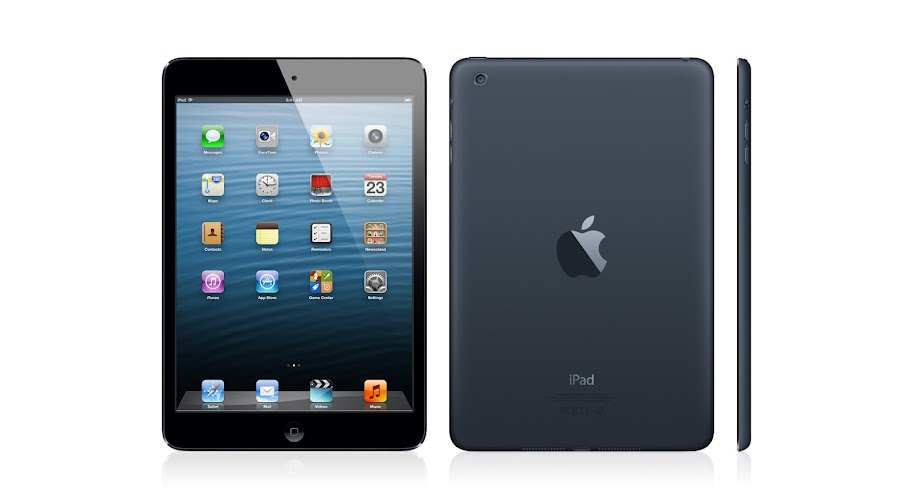
Apple announces 4th generation iPad packing an A6X CPU
What i want to do is when i open one of this button that the tab bar still comes up on the page. See page
^ This is what i want it to look like when i click on the button But it looks like this.
help please!!

In a better world, no one would have to use Java anymore. Sadly there are still university programs where people are expected to use Java. Rather than cast people into the world of Eclipse, here are instructions on how to get Xcode building Java. These instructions are current as of Xcode 4.6.2. You will need to download a JDK from somewhere.
This is a basic environment meant only for writing simple school programs. It has no debugger. Replace
1) In Xcode, File > New > New Project > Other > External Build System
2) Give it a meaningful name
3) File > New > New File > Other > Empty
4) Give it a Java-friendly name. In my example, use
5) Copy the contents below into the file and save.
6) File > New > New File > Other > Empty
7) Save as Makefile.
8) Copy the contents below into the file and save.
9) The "Run" (>) button should at least compile your Java now.
Now it gets tricky. You don't have to do the next part. You could just open a Terminal to your project directory and run java
9) Project > Scheme > Edit Scheme > Debug > Info tab
10) Executable > Other > type ^?g > type /usr/bin > choose java
11) Change Debugger to None
12) Arguments tab
13) For Arguments Passed on Launch, add $(TARGETNAME)
14) For Environment Variables, add CLASSPATH with a value of $(PROJECT_DIR)
15) For Expand Variables based on, use
16) Click the "Run" (>) button.
PS: I have no idea how to run the Java debugger in Xcode. But then, I have no idea how to run the Java debugger at all.
Here are some starter file contents:
HelloWorld.java:
public class HelloWorld
{
public static void main(String[] args)
{
System.out.println("Hello, World!");
}
}
Makefile:
# A simple makefile for a Hello World Java program
# Define a makefile variable for the java compiler
JCC = javac
# Define a makefile variable for compilation flags
# The -g flag compiles with debugging information
JFLAGS = -g
# typing 'make' will invoke the first target entry in the makefile
# (the default one in this case)
default: $(subst .java,.class,$(wildcard *.java))
# this target entry builds the Average class
# the Average.class file is dependent on the Average.java file
# and the rule associated with this entry gives the command to create it
#
%.class : %.java
$(JCC) $(JFLAGS) $<
# To start over from scratch, type 'make clean'.
# Removes all .class files, so that the next make rebuilds them
#
clean:
$(RM) *.class
NOTE: Those indentations are true tab characters. Ugh!
Good luck on your class. Hopefully you can progress onto more complicated projects and eventually use a real language like Objective-C.
Hi,
I have a few questions about the development program from Apple. If I become a registered developer...
1- Will I be able to install my app in my iPhone directly from my computer/XCode without having to upload it to the app store?
2- What happens to applications added to the app store after canceling your membership?
Thanks a lot.
I'm pretty sure that such thing is banned from the Apple Store.
It is possible to buy credits for PokerStars inside their Apple APP without using the AppStore.
Apps cannot have their own built-in way to charge people for their services.
Apps should only use AppStore to sell stuff with their apps.
Am I wrong ?
I sense something wrong here.
Looks like they are avoiding the 30% fee that should go to Apple.
hi, as part of an app I'm writing(my first) I need to constantly convert NSDates to NSStrings and vice-versa. So I thought I would write the 2 functions but include them as methods with the main controller and call them with something like
[self convertToDate:stringToConvert]
However , I'm experiencing problems and getting warnings all over the place - may be because I'm calling them from within 'proper' methods in the class. The functions themselves are pretty straight forward and I've copied them from forums like this one
I realise this is probably not best practice , but how else would I do it? Would I create a separate .h and .m files.
Any thoughts would be gratefully received. I have posted threads about mixing normal functions and methods on this forum and I am grateful for all your feedback , and this relates to this matter , but I'm starting to wonder if my approach is wrong?
I found a recent corruption in the urls provided by the apple hotnews rss feed, or at least what appears to be corruption. Can anyone shed some light on this?
The link I am using is:
http://images.apple.com/main/rss/hotnews/hotnews.rss
Pastebin of rss contents (since it will likely change)
The error appears in the format:
$true_link$ ?sr=hotnews.rss
The expected value should be:
$true_link$?sr=hotnews.rss
it appears to simply be a referral parameter, and as such one can simply tokenize the input and take the first token, but it is a bit of a bummer to have to clean (some of) the data manually.
-Christophe


